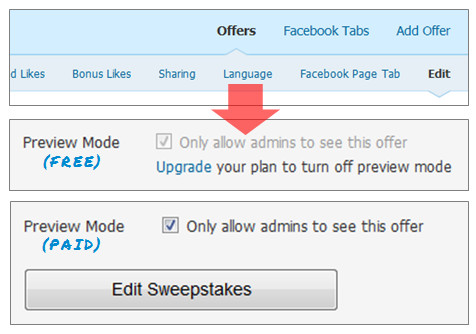
A lot of requests have been coming in recently for the ability to preview offers before making them available to the public. So, naturally, we added a Preview Mode – to everything! This means you now have the option to set up an offer and do a test-run on your Facebook Page tabs before you actually make it go live!
No more worrying about fans visiting a page tab that is still a work in progress, or Sweepstakes entries to a contest that isn’t supposed to start yet – just keep it all hidden from the public eye (visible by admins only) until you’re ready to unveil your next masterpiece! Check it out in your Woobox Promotions Manager.
[caption id="attachment_296" align="aligncenter" width="476" caption="Change Preview Mode options when you Edit offers in your Woobox account ."][/caption]
Now, even users with free accounts have the capability to set up any type of promotion, to see how it could look as a campaign. This is great news for anyone who has been on the fence about signing up for a Plus or Pro-level plan, because Preview Mode allows you to try all of our offer types before you pay or implement them. Go ahead, log in and create a new offer to experiment with!
We've also enabled Preview Mode in our free Custom HTML Page Tab app. You can now make your like-gated Facebook page tab visible to admins only so users to your page tab won't see your tab content until you're ready.
[caption id="attachment_298" align="aligncenter" width="430" caption="Keep your Custom Tab under wraps until you're ready to share it with the world; just click the Preview Mode icon at the top of your Tab Settings page."]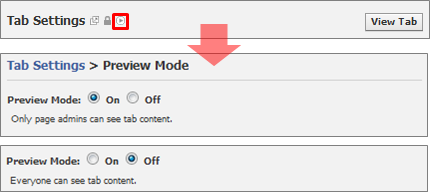 [/caption]
[/caption]
Now, even users with free accounts have the capability to set up any type of promotion, to see how it could look as a campaign. This is great news for anyone who has been on the fence about signing up for a Plus or Pro-level plan, because Preview Mode allows you to try all of our offer types before you pay or implement them. Go ahead, log in and create a new offer to experiment with!
We've also enabled Preview Mode in our free Custom HTML Page Tab app. You can now make your like-gated Facebook page tab visible to admins only so users to your page tab won't see your tab content until you're ready.
[caption id="attachment_298" align="aligncenter" width="430" caption="Keep your Custom Tab under wraps until you're ready to share it with the world; just click the Preview Mode icon at the top of your Tab Settings page."][/caption] 


Build a campaign in seconds
Describe a giveaway, quiz, poll, survey, or coupon and Woobox launches a hosted, mobile-ready page in seconds. Free to start, no credit card.
Try Woobox free