 This new feature works just like FormGate in the custom tabs. You can follow these step-by-step instructions for creating and using HTML forms. For those of you who want to get a little more complex with the in-offer forms, or if you just need a little more guidance with writing the basic code, you can also check out the chapter on HTML Forms & Input from W3Schools.com. If you want to get really advanced, you can also use Javascript with your forms.
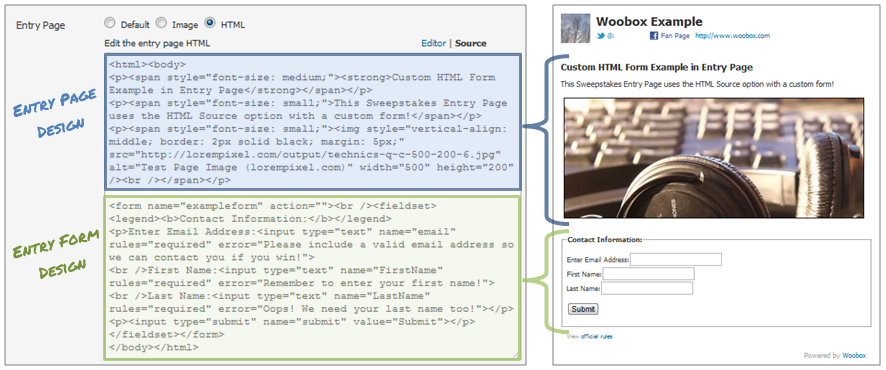
To add a custom form, in the Edit section of your offer, simply select HTML as the option for the Entry/Offer Page setting and add your HTML. When you do this, the form input code will be automatically detected, and the default Woobox entry form will be hidden.
This new feature works just like FormGate in the custom tabs. You can follow these step-by-step instructions for creating and using HTML forms. For those of you who want to get a little more complex with the in-offer forms, or if you just need a little more guidance with writing the basic code, you can also check out the chapter on HTML Forms & Input from W3Schools.com. If you want to get really advanced, you can also use Javascript with your forms.
To add a custom form, in the Edit section of your offer, simply select HTML as the option for the Entry/Offer Page setting and add your HTML. When you do this, the form input code will be automatically detected, and the default Woobox entry form will be hidden.
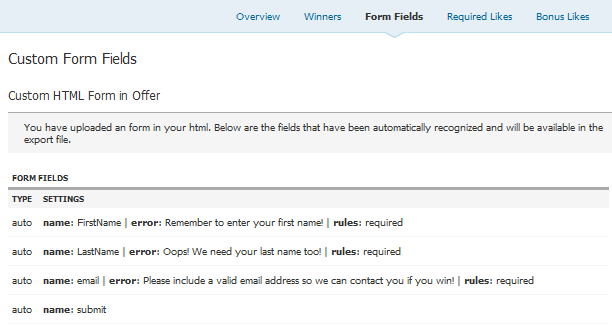
As with the usual form fields that you add to an offer, your custom HTML form fields and their details (rules, error message) will be shown in the Form Fields tab of your offer. Additionally, the submitted information will be available in the downloadable export file that you can view with your favorite spreadsheet program.
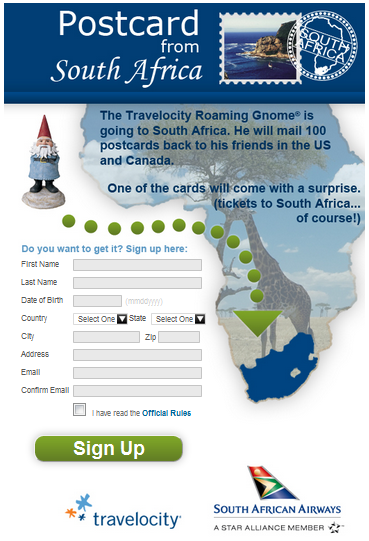
This new feature provides an infinite number of options in terms of design, as you can see in the South African Airways Sweepstakes and live examples above. You can use custom forms with any account level, and it's available for use within all offer types. Get started now by adding a new offer!
Remember, now that Woobox offers Preview Mode, even users with a Free account can create and test any type of offer (only available for viewing by admins) before purchasing a paid plan starting at $29. So feel free to test out the Custom HTML Form feature within Woobox's different offer types; then when you decide to run a promotion, just upgrade your account and your offer will be ready to go!
Want to know more about Woobox and be up to date on all future changes? Just make sure to "Like" us on Facebook and follow @wooboxapp on Twitter to see our latest and greatest news, plus other tips and information to help you create and maintain successful social promotions!




Build a campaign in seconds
Describe a giveaway, quiz, poll, survey, or coupon and Woobox launches a hosted, mobile-ready page in seconds. Free to start, no credit card.
Try Woobox free